How to Require Approval for Actions
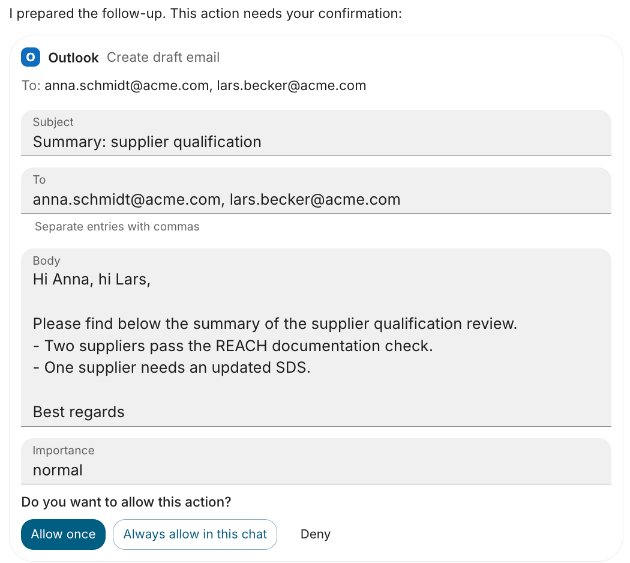
Make an agent ask the user before it runs a tool that sends, writes or deletes. The user sees an approval card and approves or declines the call. Set it per agent, or for every agent and some users with a setting rule.
Per agent
Open the agent and click Edit Agent. Under Capabilities, Tools and MCP Tools take three settings:
| Setting | Where | Options |
|---|---|---|
| Default for MCP tools | MCP Tools → Ask the user before | Only the tools listed below, Tools that may change data (tools the server does not mark read-only), Every tool call |
| Default for a source or server | Asks first: next to the source or server | Auto, Always ask, Never ask |
| One tool | Confirmation column of the tools table | Auto, Always ask, Never ask |
Auto leaves the decision to the next rule, and finally to the model's prompts. Always ask and Never ask are stored as the agent's setting rules, which only run while the agent's access rules are on: setting one switches them on. Click Save Changes.
For Microsoft 365, set MCP Tools → Ask the user before to Tools that may change data (confirmation_default: non_read_only): the server marks its read tools read-only, so only its writing tools (create-draft-email, upload-file-content, create-drive-item-share-link) ask first. New tenants start with this setting.
For every agent, or for some users
On the Access rules page, click Add setting rule under Setting rules: pick who it Applies to, set Asks first to Always ask, switch on Locked so agents cannot override it, and name the server or tool under Resources. Click Save setting rule. See Rules. Use this to require approval for a team while others work without it:
{ "name": "Sales ask before sending mail", "principals": ["user_role_id:<sales team id>"], "resources": ["mcp:outlook/send_email"], "values": { "confirmation": "always" }, "locked": true }
What users see
The approval card shows the app name and icon set on the MCP server. Under Connected apps a user can set a tool to Always allow, Ask first or Off. Always allow waives only the Ask the user before default, never an Always ask, see Tool rules.
Pitfalls
- Never ask cannot lift an Always ask set elsewhere: any rule that asks wins.
- A tool that asks first is declined when the agent calls it from Python, unless the user allowed it for the chat.
- Approvals in delegated agents reach the user too, see Approvals in delegated agents.
- The user's own choices apply only in agents that switch the
user_choicestool rule on, see Tool rules.
The rules behind these settings are in Tool rules.