How to Control Who Can Use What
Rules decide who can use which agents, models, indexes, tools sources, MCP servers and tools, and whether a tool asks first and how it loads.
| What | Where | With nothing set |
|---|---|---|
| Agents | Agent editor → Who can use this agent; a tenant rule on agent:<id> | Everyone in the tenant |
| Models, indexes and MCP servers and their tools, for every agent | Who can use it on each one's card, and policies on Tenants → <tenant> → Access rules; stored as access in the tenant's features | Everyone gets everything |
| Models, in one agent | Agent editor → Who can use each model in this agent under the model pickers; a tenant rule on the model conditioned on the agent | The tenant's rules |
| Tools, in one agent | Agent editor → Policies → Tool rules → Rules on tools; stored as access_rules_rule_source_configuration in its configuration | The tenant's rules |
| Ask first and loading | Setting rules, the tenant's or the agent's | The agent's MCP confirmation_default and its defer_tools (per source or mounted server, else per provider); otherwise the model decides when to ask and every tool loads up front |
Tenant admins are exempt from rules on agents, models and indexes. Rules on tools apply to them too.
Who decides what
Access is decided in rings. Each ring works inside what the ring around it allows and can only narrow it: an agent cannot use a model the tenant's rules keep from the user, and a user cannot switch on a tool the agent lacks.
How a request is decided
The same rings, step by step for one user. A later step never gives back what an earlier one removed.
"Allowed" is the same test for a model, an index and a tool, described in How rules decide. Document permissions come from the source system (for example SharePoint) when the connector imports them, and every search applies them.
Who can use it
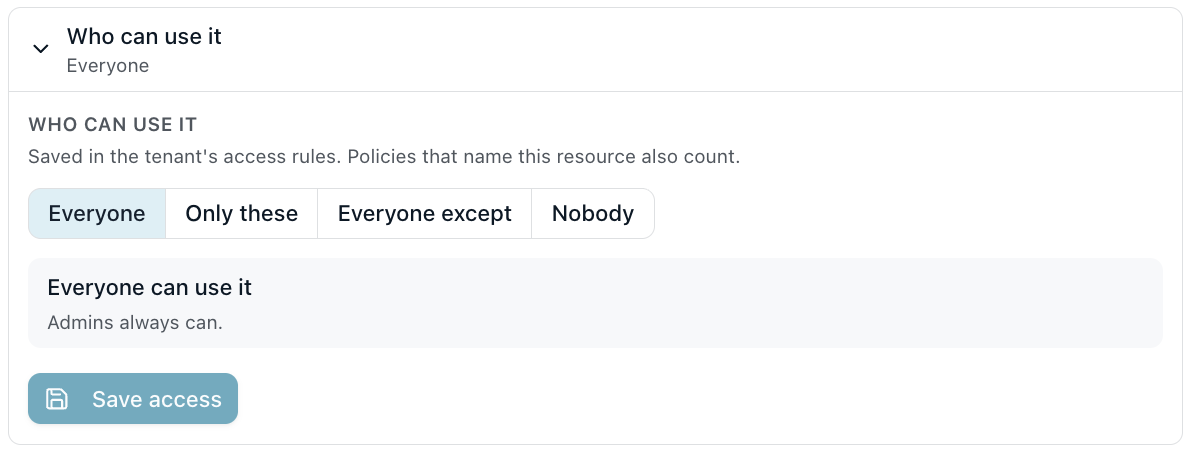
Every agent, model, index, MCP server and MCP tool has the same Who can use it control: Everyone, Only these, Everyone except or Nobody, with a users-and-teams picker for the middle two. The line under it says who actually can, counting the control and every policy on the resource. Admins always can use agents, models and indexes.
- Agents: open the agent, click Edit Agent, and set Who can use this agent. Someone the agent is not allowed to does not see it and cannot chat with it. An agent allowed to a user is still hidden from them when the rules allow them none of its models.
- Models, indexes and MCP servers: each model on the LLM Configurations card, each index on the Indexes page and each server on the MCP Servers card shows Who can use it. A server lists its tools below it, each with the same control, Same as server until someone sets it.
- A model in one agent: under the agent's model pickers, Who can use each model in this agent sets the same control for that agent only.
The control saves one rule on the resource into the tenant's rules, always a forbid: Only these forbids everyone except them, Everyone except forbids the ones picked, Nobody forbids everyone and Everyone saves no rule. A model in one agent saves the same rule with the condition "agent": ["<agent id>"]. A rule of that shape written by hand shows as the resource's control. It never saves a permit, because a permit closes its whole resource type (How rules decide).
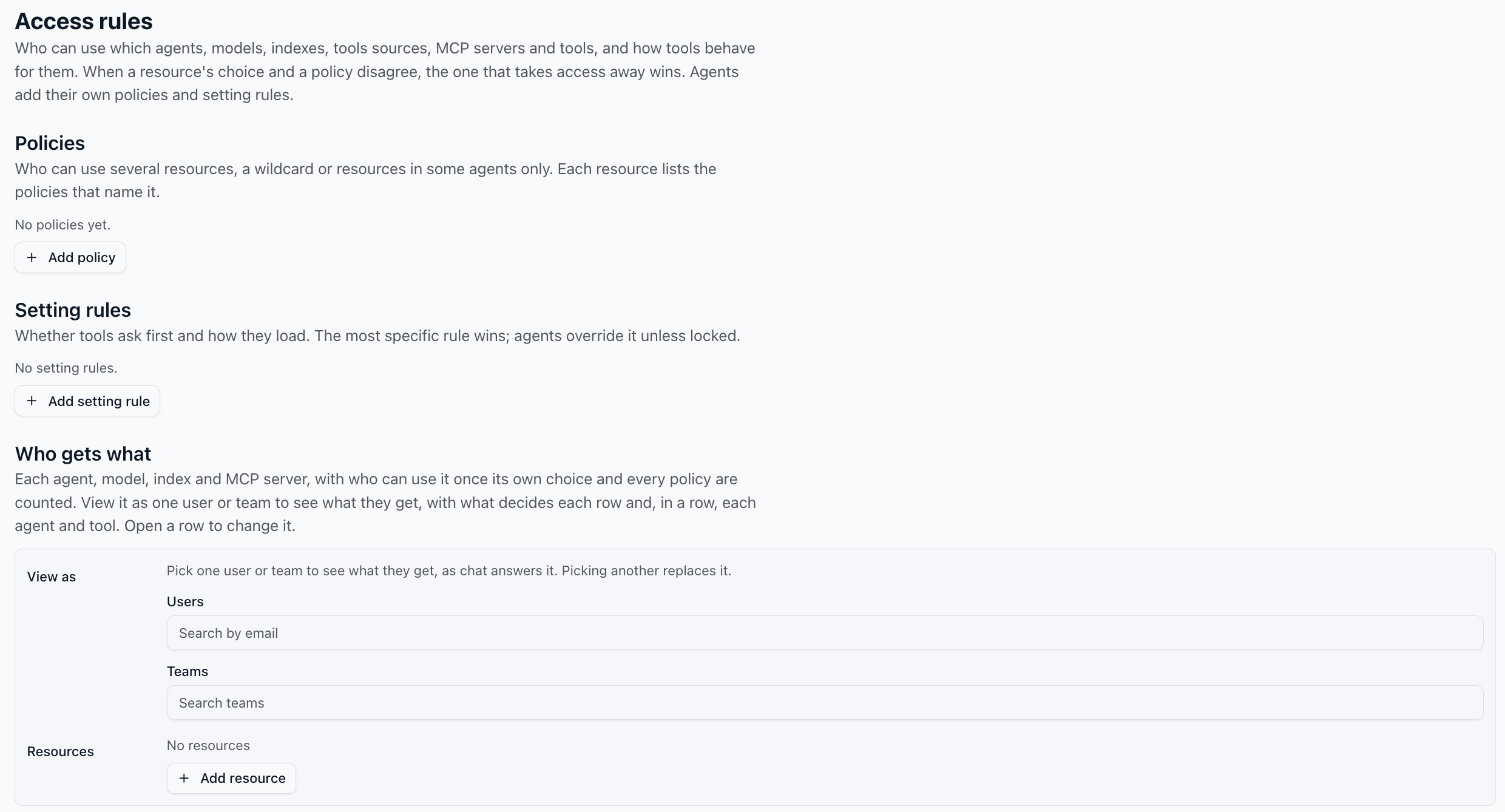
Policies that also apply lists, read-only, every other rule that names the resource, with Open in Access. The Access rules page lists each resource under Who gets what, opening the same control, and the policies under Policies.
Rules
A rule names who (principals), what (resources) and optionally the circumstances it applies in (conditions).
For every agent:
- Open Tenants → <tenant> and click Edit on the Access rules card.
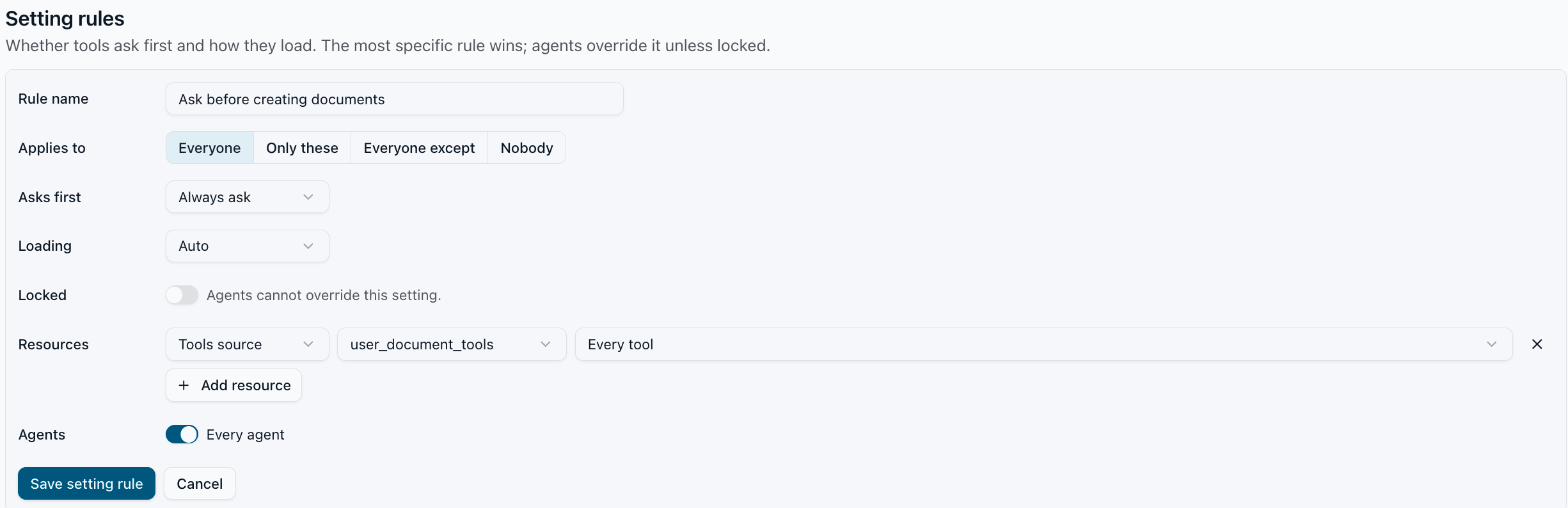
- Under Policies, click Add policy. Under Setting rules, click Add setting rule.
- Fill in Rule name, then pick who: Everyone, Only these, Everyone except or Nobody (Who can use it on a policy, Applies to on a setting rule). Under Resources, click Add resource and pick the kind (Everything, Agent, Model, Index, Tools source, MCP server), which one and, for a tools source or MCP server, the tool. Leave Every agent on, or pick the agents.
- For a setting rule, set Asks first (Auto, Always ask, Never ask), Loading and Locked.
- Click Save policy or Save setting rule.
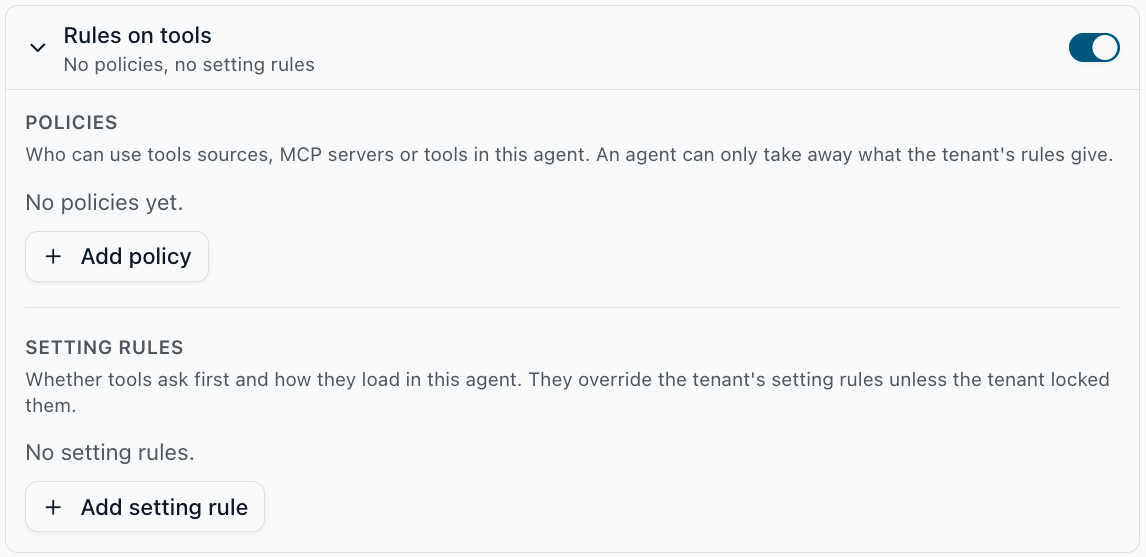
For one agent: in the agent editor, open Policies → Tool rules → Rules on tools. It lists the tenant's rules on tools that apply in the agent, read-only, then the agent's own Policies and Setting rules. An agent's policies can only take away what the tenant's rules give, and agent setting rules have no lock.
The tenant's rules are stored in the tenant's features:
"access": {
  "rules": [
    { "name": "R&D models", "principals": ["user_role_id:<r&d team id>"], "resources": ["model:gpt-big", "model:gpt-small"] },
    { "name": "Everyone's model", "principals": ["public"], "resources": ["model:gpt-small"] },
    { "name": "Default index", "principals": ["public"], "resources": ["index:<default index id>"] },
    { "name": "Who gets research", "effect": "forbid", "principals": ["public"], "except_principals": ["user_role_id:<r&d team id>"], "resources": ["agent:research"] },
    { "name": "SharePoint for Finance only", "effect": "forbid", "principals": ["public"], "except_principals": ["user_role_id:<finance team id>"], "resources": ["mcp:sharepoint"] },
    { "name": "No web search in the research agent", "effect": "forbid", "principals": ["public"], "resources": ["tools:web_tools"], "conditions": { "agent": ["research"] } }
  ],
  "settings": [
    { "name": "Ask before sending mail", "principals": ["public"], "resources": ["mcp:outlook/send_email"], "values": { "confirmation": "always" }, "locked": true },
    { "name": "Load Outlook on demand", "principals": ["public"], "resources": ["mcp:outlook"], "values": { "loading": "on_demand" } }
  ]
}
An agent keeps its own in its configuration, in the same format. Its access rules can only forbid; a permit there has no effect.
"access_rules_rule_source_configuration": {
  "rules": [
    { "name": "Big model for leads only", "effect": "forbid", "principals": ["public"], "except_principals": ["user_role_id:<leads team id>"], "resources": ["model:gpt-big"] }
  ],
  "settings": [
    { "name": "Ask before web search", "principals": ["public"], "resources": ["tools:web_tools"], "values": { "confirmation": "always" } }
  ]
}
| Field | Rule | Description |
|---|---|---|
name | both | Label; Who gets what, viewed as a user or team, names the rule that decided |
principals | both | user_uuid:<uuid>, user_role_id:<team id>, or public for every user of the tenant. Default ["public"]. A user matches the rules that name them, their teams or public |
except_principals | both | Callers the rule skips |
resources | both | The resources the rule covers |
conditions | both | Tenant only: the circumstances the rule applies in, as {"<key>": [<values>]}. Today the key is agent, with agent identifiers. Every key must hold, by any of its values; unset means everywhere. Where a condition does not hold the rule does not exist, so a permit conditioned on agent C closes its resource type only in C. Indexes are not per agent: an index rule with an agent condition applies nowhere. An unknown key is refused when the agent loads its rules |
effect | access | permit (default) or forbid |
values.confirmation | setting | always asks the user first and their Always allow cannot waive it; never waives asking, including the agent's MCP confirmation_default |
values.loading | setting | up_front or on_demand, see Tool search |
locked | setting | Tenant only: the value holds even where the agent sets the key |
Resources
| Name | Covers |
|---|---|
agent:<id> | An agent by its identifier: who may see and use it |
model:<name> | An LLM configuration by name |
index:<id> | An index |
tools:<source> | A tools source (for example web_tools) and every tool in it |
tools:<source>/<tool> | One tool of a tools source |
mcp:<server> | An MCP server and every tool in it |
mcp:<server>/<tool> | One tool of an MCP server |
model:*, mcp:*, ... | Every resource of that type |
* | Everything |
How rules decide
For access, an agent, a model, an index or a tool:
- A forbid that matches the caller, the tenant's or the agent's, removes it.
- Otherwise, once the tenant's rules permit some resources of a type (
agent,model,index,tools,mcp), a caller needs a matching permit for each resource of that type. A permit on*does this for every type. - A type the tenant permits nothing of stays open: everyone gets all of it.
Tools follow the same type rule as models. So a permit both grants and restricts: the "R&D models" rule above leaves everyone outside R&D without gpt-big, and a permit on mcp:sharepoint for Finance would close every other MCP server to everyone, Finance included. To keep one resource for some users and leave the rest of its type open, forbid it for everyone except them. "SharePoint for Finance only" above does this: Finance keeps SharePoint, everyone else loses it, and every other server stays open.
For settings, per key (confirmation, loading):
- The agent's configuration sets the default. For loading: a source's or mounted server's own
defer_tools, else its provider's, see Tool search. For asking first: the agent's tools settings, see Tool rules. - A matching setting rule decides over that default. Among the matching setting rules of one layer, the most specific decides: one tool before a source or server, before
<type>:*, before*; then a user before a team before everyone; then the later rule in the list. - The agent's setting overrides the tenant's unless the tenant's rule is
locked.
Where the rules apply
- Agents. A user sees and runs only the agents the tenant's rules allow them. Only the tenant's rules without an
agentcondition decide agents. - Models. An agent offers a user only its allowed models: its default and its selectable models. When the default is not allowed, the first allowed one takes its place. With none allowed the agent is hidden, and a chat with it is refused with
Agent '<id>' is not available to you. - Indexes. The Navigator lists only the allowed indexes. The search API refuses any other with
403andIndex '<index id>' is not available to you., on top of each document's own access rights. Only the tenant's rules decide indexes. - Tools. Before each model call, a tool the rules remove is neither offered nor runnable. The rules run as the
access_rulestool rule source, only in agents that switch it on (the agent editor's Rules on tools row); rules on models and indexes apply in every agent.
Check what someone gets
On the Access rules page, under Who gets what, pick a user or team in View as. A user is checked together with their teams. Each row then says whether they can use that agent, model, index, MCP server or tools source, and what decides it; tools sources join the list. Open a row to see it in each agent that has it, with every tool: on or off, whether it asks first, and what decides it (Decided by): a tenant rule or an agent rule by name, an agent setting, a tool rule source, or nothing, when the model decides. Resources narrows the rows the way a rule picks resources. The user's own switches in chat are left out.
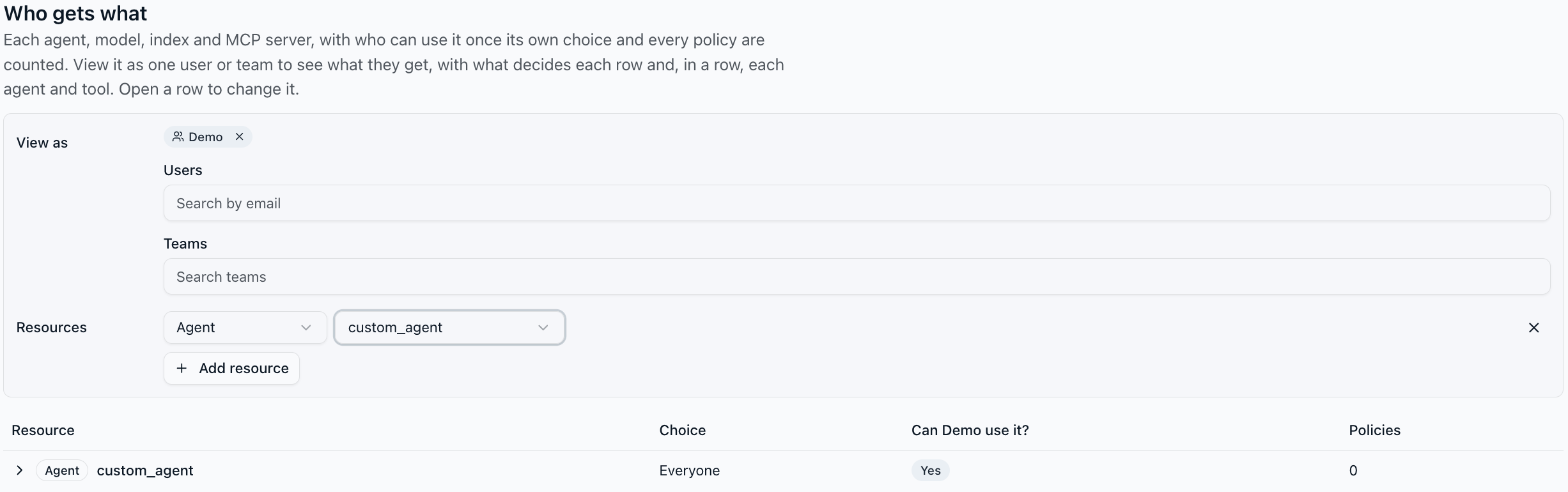
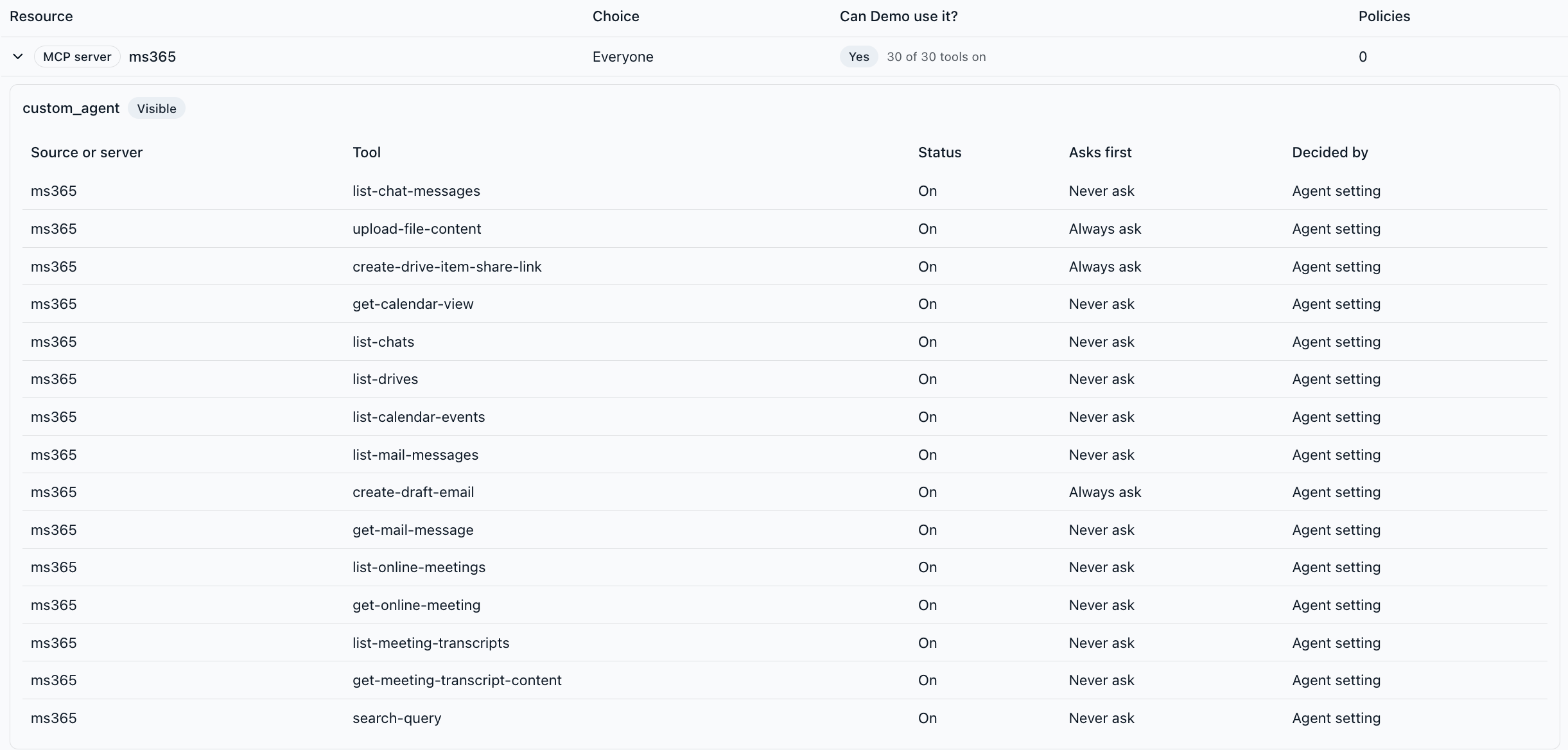
Conflicts are listed above the table: an agent allowed to them that none of their models reaches, an agent setting rule a locked tenant setting overrides for them, and an agent rule naming a tools source or MCP server the agent does not have. An MCP server lists its tools once you have connected it in chat yourself.
Pitfalls
- A permit restricts its whole type: once the tenant permits one
mcp:server, every server it does not permit is closed to everyone. Keep a server for one team with a forbid andexcept_principals, not a permit. - A rule with an empty
principalslist applies to nobody.