How to Connect GitHub
🔧 Tools · MCP
The Remote GitHub MCP Server at https://api.githubcopilot.com/mcp/ exposes repositories, issues, pull requests, Actions, code scanning, and more. The example below enables the X-MCP-Readonly: true header to keep the agent read-only; drop the header to let it write.
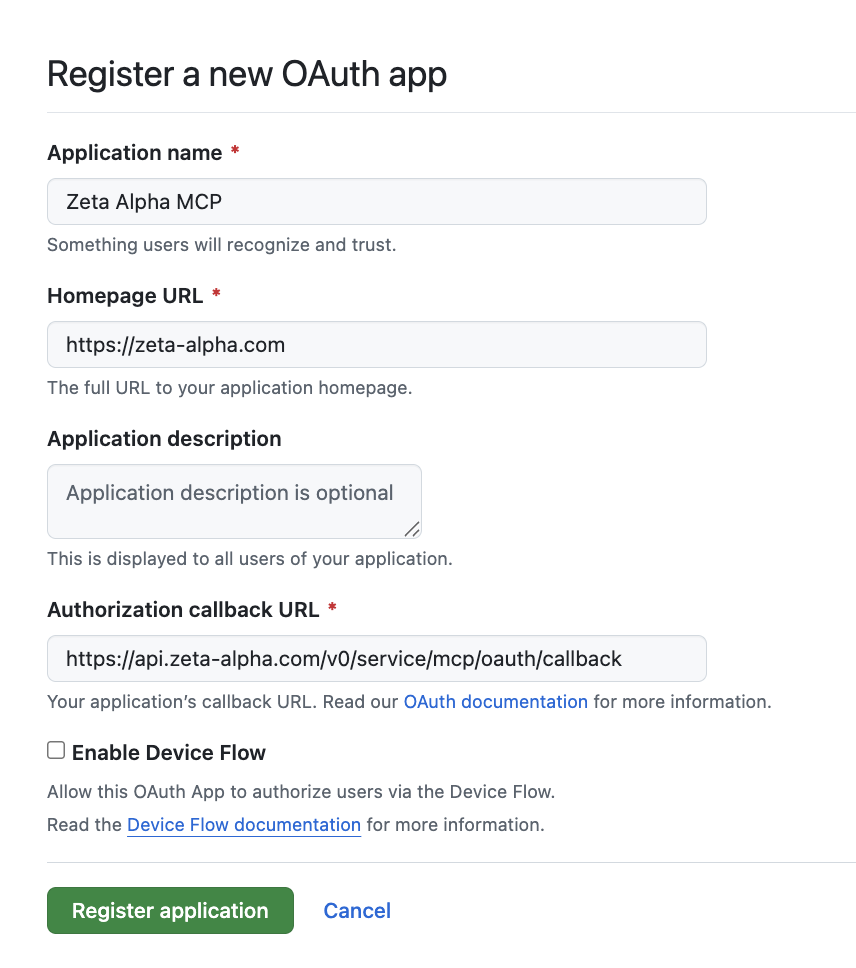
1. Create a GitHub OAuth App
- Go to OAuth Apps → New OAuth App under your account's Developer settings, or your org's (e.g.
https://github.com/organizations/<your-org>/settings/applications) to own the app at the org level. - Fill in:
- Application name —
Zeta Alpha MCP. - Homepage URL —
https://zeta-alpha.com. - Authorization callback URL —
https://api.zeta-alpha.com/v0/service/mcp/oauth/callback.
- Application name —
- Register, then Generate a new client secret and copy it immediately — GitHub only shows it once.
2. Add the Server to the Agent
In Platform Admin, open the agent's Configuration and add this entry to mcp_tools_provider_configuration.servers (see Connecting MCP Servers):
{
  "transport": "streamable-http",
  "transport_config": {
    "streamable_http": {
      "url": "https://api.githubcopilot.com/mcp/",
      "name": "github",
      "headers": {
        "X-MCP-Readonly": "true"
      },
      "timeout": 30,
      "oauth_client": {
        "server_url": "https://api.githubcopilot.com/mcp/",
        "client_id": "<GitHub Client ID>",
        "client_secret": "<GitHub Client secret>",
        "client_metadata": {
          "client_name": "Zeta Alpha MCP",
          "grant_types": ["authorization_code", "refresh_token"],
          "response_types": ["code"],
          "token_endpoint_auth_method": "client_secret_post",
          "redirect_uris": [
            "https://api.zeta-alpha.com/v0/service/mcp/oauth/callback"
          ]
        }
      },
      "terminate_on_close": true
    }
  }
}
To narrow the toolset use the URL path variants documented in GitHub's remote-server docs (e.g. https://api.githubcopilot.com/mcp/x/repos).
3. Connect from the Navigator
Open a new chat, select the agent, and ask it for something that needs GitHub (e.g. "Show me the README of the platform repo"). Follow the Connect prompt — see Connecting from the Navigator for the full walkthrough.
If the organization enforces OAuth App access restrictions, an owner must approve the app under Organization settings → Third-party access → OAuth app policy before private-repo tools will work.
Troubleshooting
| Symptom | Cause |
|---|---|
| Redirect URI mismatch | Authorization callback URL on the GitHub app differs from redirect_uris. |
| Tools work for public repos but fail on private ones | The user's grant isn't approved for the org. An owner must approve the app, or the user must request access from the consent screen. |
| Writes return 403 | Either X-MCP-Readonly: true is set, or the user didn't grant write scopes. |