Creating Your Own Agents
Make an agent with your own instructions, capabilities and apps, use it in the chat, and share it.
Create an Agent
Open the agent picker above the message box and click New Agent. In Create Your Own Agent:
- Give it an Agent Name, a Description and Instructions that say how it should behave and what to focus on.
- Under Capabilities, choose what it may use: Web, Delegate to agents, Enable memory and Skills (all skills, or the ones you filter).
- Under Connected apps, choose which apps it may use. Each user connects their own account, see Connected apps.
- Under Context, add documents or tags to give it a head start.
- Click Create.
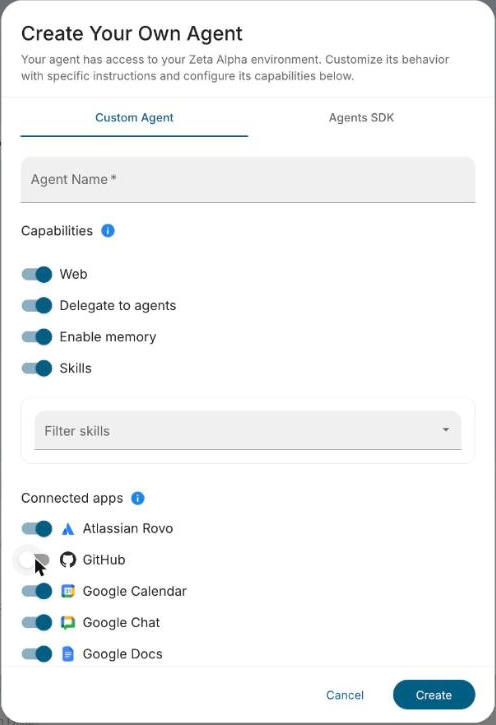
The agent then appears in the agent picker. The gear next to its name edits it.
Manage and Share
Agents → Settings in the sidebar lists your agents. From each row you can edit, delete, schedule or share it:
- Share chooses who can access the agent. People you share with find it in their agent picker and can use it in their chats.
- Schedule runs the agent once or on a recurring schedule.
An agent shared with you, or one your organization provides, can't be edited. Copy it to make your own version.